
Molecular biology tools inside your AI chat.
Annotate plasmids, design primers, check enzymes, and verify clones in ChatGPT or Claude. The AI helps you ask. Plasmole runs the biology.
Free, with a Plasmole account. See the steps
Plasmole MCP lets you do real molecular biology work inside the chat you already use. Paste a sequence, upload a file, or give an NCBI accession, then ask in ordinary lab language.
Plasmole runs the calculation and sends back a structured result, including an interactive plasmid map when it helps.
This is Plasmole MCP V1. Free to try. We are already building V2.
Setup takes about a minute: step-by-step setup →
Why this exists
Say you want to add a C-terminal His-tag to an insert. A routine edit. Today that usually means bouncing between tools:
- Pull the parent sequence from NCBI or a repository
- Design primers in a separate tool
- Re-check the melting temperatures somewhere else
- Check the restriction sites in a third place
- Open a plasmid editor just to see the map
Same sequence, pasted into five or six places. And you often find out the primers failed only after the oligos arrive days later, so you redesign, reorder, and wait again.
Plasmole MCP puts that work in one conversation.
What you can do
Ask the way you would ask a labmate. A few common requests:
- Add a C-terminal tag
Insert a 6xHis tag just before the stop codon of my insert, keeping my annotations.
The tag spliced in base for base. A site you name is located deterministically; a coordinate is used as given, whether you or the model worked it out. Pass your annotations and they are carried across the edit, with a frameshift warning when an edit cuts an annotated CDS and its net length change is not a multiple of 3; without them the product is annotated afresh from the parts catalog. Nothing checks the tag’s frame or that a stop follows it, so translate it before you order.
Computed with deterministic splice and feature remapping.
- Check enzymes before you cut
Before I digest with NdeI and XhoI, check my insert has no internal NdeI or XhoI sites.
Every cut site mapped on the plasmid, so you know the pair is safe to use, or that you need a different one.
Computed with BioPython Restriction / REBASE.
- Screen your colonies
Design colony-PCR primers that tell a positive clone from empty vector, and predict the band sizes.
Primer pairs with matched Tm and GC, plus the band sizes to expect for insert versus no-insert.
Computed with Primer3 (Untergasser et al. 2012).
- Verify a clone
Align this Sanger read against my expected construct. Did my clone pick up any mutations?
Percent identity and the exact base changes, so you confirm the clone instead of eyeballing a chromatogram.
Computed with pairwise sequence alignment.
More things you can ask, in plain language:
- “Annotate this plasmid and show me an interactive map.”
- “Design primers to amplify bases 430 to 1,280.”
- “What is the Tm and GC content of this primer?”
- “Find every unique cutter in my MCS.”
- “Fetch NM_002046 from NCBI and annotate it.”
- “Import this GenBank file and list its features.”
- “Assemble these two fragments by Gibson.”
- “Export this construct as GenBank.”
V1 includes 22 research-use tools. Full list at the bottom of this page.
See it in action
Pick a capability to preview what comes back in chat. This uses the same plasmid map people see in the connector.
- Identity
- 99.7%
- Comparison
- Reference pUC19-GFP vs Sanger read (720 bp)
- pos 142: A→GSynonymous in GFP coding region
- pos 501: T→CVerify against template before proceeding
- Anneal temp
- 58°C
- Product size
- 720 bp
- Forward primer
- ATGGTGAGCAAGGGCGAGGAGC Tm 62.4°C · 63.6% GC
- Reverse primer
- TTACTTGTACAGCTCGTCCATG Tm 61.1°C · 45.5% GC
Annotate a sequence auto_annotate
Annotate this plasmid and show me the features.
ORFs matched against the parts catalog. Each plasmid-producing tool returns an interactive map you can pan and click in chat.
This is a static preview. In chat, plasmid and primer results include an “Open in Plasmole →” link for saving them.
How results are computed
Sequence work here is computed, not generated. Your request goes to established bioinformatics software and you get its output back:
| Primer design | Primer3 (Untergasser et al. 2012) |
|---|---|
| Melting temperature (Tm) | SantaLucia 1998 nearest-neighbor thermodynamics |
| Restriction sites | BioPython Restriction / REBASE |
| Annotation | ORF detection against a 1,300+ parts catalog |
| Clone verification | Pairwise sequence alignment |
Same input, same output. Plasmid tools also return an interactive map you can pan and click in chat.
What's not included in V1
This chat connector is not the full Plasmole app. It does not:
- Read plasmids from your existing Plasmole library
- Save results directly into your library
- Provide the complete Plasmole sequence editor
- Include an electronic laboratory notebook
- Manage complete experimental workflows
- Provide every feature available in the main Plasmole workspace
Access and privacy
- Free to use, with no install. You must sign in to your Plasmole account and approve access once. No tool runs without it.
- Plasmole only receives the structured inputs and results for the tool you call. Your conversation is not logged.
- Signing in tells us which account made a call, so we can apply your rate limits. It does not give the connector access to your workspace: no tool reads or writes your plasmids, entries or library.
- Constructs you build or edit in chat are kept for 7 days, so you can compare and restore versions.
- Each “Open in Plasmole →” link works once and expires after 24 hours.
- Saving into Plasmole needs a project you lead.
Plasmole runs a tool only when you ask for it, using just the sequence or file you provide in that request. Full notice: plasmole.com/privacy.
What's next
V1 is the foundation: reliable molecular-biology calculations in the AI apps researchers already use.
V2 is about longer, more connected workflows, clearer results, and a smoother path from chat into the full Plasmole workspace. We will announce specifics only when they are ready.
Your feedback shapes what we build. Try V1 on a real plasmid, PCR, restriction-analysis, or clone-verification task, and tell us:
- Which laboratory task saved you the most time
- Where the connector became unclear
- Which result still required another piece of software
- Which workflow you want to complete entirely through chat
- What would make the connector useful in your laboratory every week
Write to [email protected].
Connect Plasmole
In ChatGPT, Plasmole is a published plugin: open it and install. In Claude, one link opens the add-connector form with Plasmole already filled in. Both need a free Plasmole account. You sign in once, before the first tool runs.
Three steps, about a minute.
- The button opens the Plasmole plugin page in ChatGPT. Click Install plugin.
- The first time a tool runs, ChatGPT asks you to connect your Plasmole account: sign in once and approve.
- Ask in plain words. Type @ and pick Plasmole to make sure the chat uses it. Paste a sequence, upload a GenBank file, or give an NCBI accession.
Link not opening? Go to chatgpt.com/plugins and search for Plasmole. Business and Enterprise workspaces may need an admin to allow the plugin first.
Works on claude.ai and in the Claude desktop app. Pick your plan:
- The button opens Add custom connector in Claude with the name and URL already filled in. Claude notes that they came from a link: check that it says it connects to
plasmo-backend.onrender.com, then click Continue. - When Claude asks, click Connect, sign in to Plasmole, and approve access. This sign-in is required.
- Turn Plasmole on per conversation from the + menu → Connectors.
Add it by hand instead
- Go to Settings → Connectors, click Add, and choose Add custom connector.
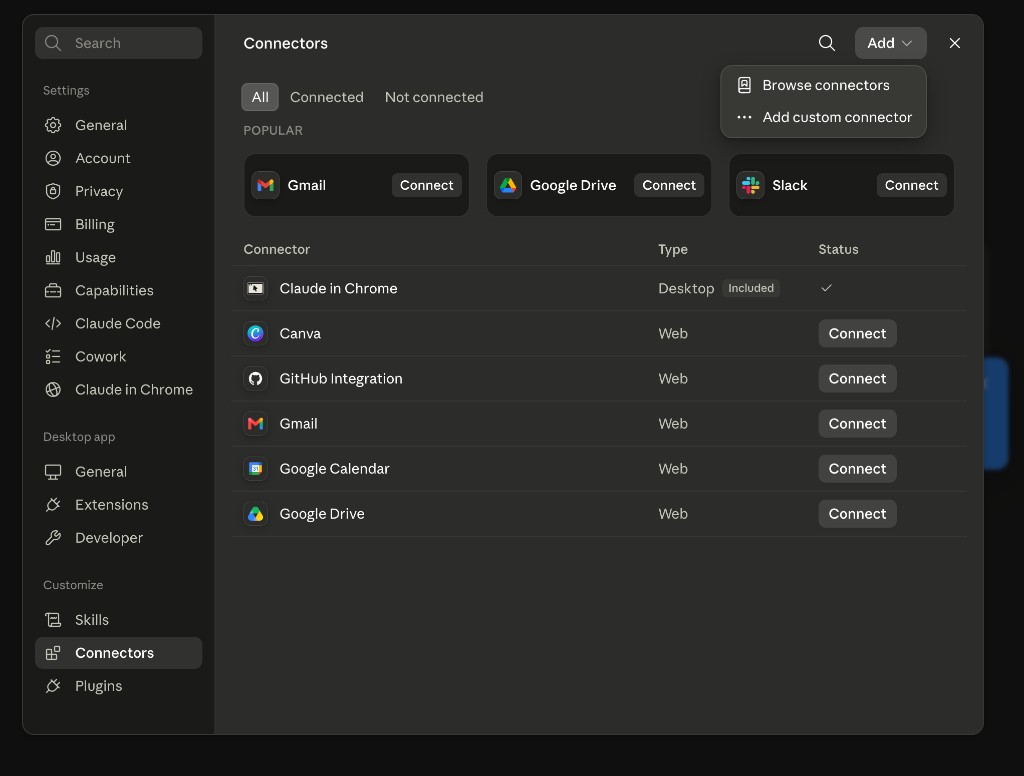
Settings → Connectors → Add → Add custom connector. - Set the name to Plasmole and paste the connector URL below. Leave the OAuth Client ID and Client Secret under Advanced settings empty. Claude identifies itself to Plasmole on its own. Click Add.
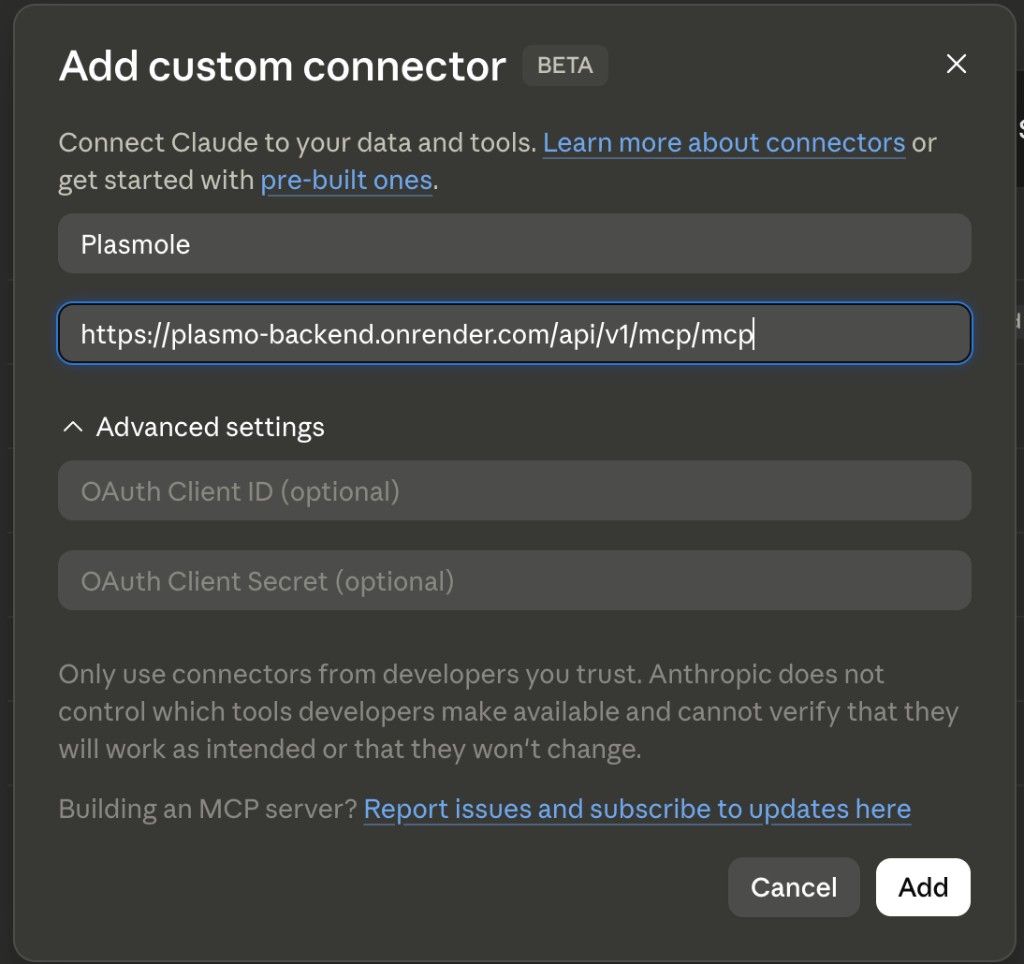
Name it Plasmole and paste the URL. Leave the OAuth Client ID and Secret empty. - Click Connect, sign in to Plasmole, and approve access.
Prefer watching? A walkthrough of this route, under 30 seconds.
Add to Claude for your organization
- An Owner clicks the button. It opens Organization settings → Connectors with Plasmole and its URL filled in. Check that it connects to
plasmo-backend.onrender.comand confirm. - Members then go to Settings → Connectors, click Connect, and sign in to Plasmole.
Add it by hand instead
- An Owner opens Organization settings → Connectors.
- Click Add, hover Custom, then choose Web.
- Paste the connector URL below and click Add.
Connector URL
https://plasmo-backend.onrender.com/api/v1/mcp/mcpOptional: on the Plasmole connector page, set Tool permissions to Always allow so Claude doesn’t ask before each call.
Claude Code and the mcp-remote proxy can’t connect yet. Their sign-in returns to your own computer, which Plasmole does not accept.
Then send your first message
No file needed. Copy one into a new chat:
- Fetch the pUC19 cloning vector (M77789.2) from NCBI and show me an annotated plasmid map.
- Show me the pBR322 map with its genes and restriction sites (accession J01749).
- What is the Tm and GC content of the M13 forward primer GTAAAACGACGGCCAGT?
Rate limits
- Connected account
- Every connector call is authenticated to your account. Requests share the same per-caller hourly ceiling as the rest of the API, which normal use does not reach. The earlier anonymous tier was retired in July 2026.
- External fetches
- Sequence fetches from NCBI are cached for seven days, so repeating the same accession does not re-query the upstream service.
Troubleshooting
- Client won't connect
- In ChatGPT, install Plasmole from its plugin page rather than adding a server by hand. In Claude, use the Add to Claude link, or confirm the connector URL is copied exactly, and check that your plan allows custom connectors.
- Unexpected biology results
- Tell the assistant explicitly whether your sequence is linear or circular, and search NCBI before fetching when you only have a gene name. Verify critical cloning decisions against source records before acting.
Lifecycle commitment
We've publicly committed to when we sunset this connector if it stops meeting usage thresholds, with 30 days notice. This isn't a forever promise, it's a real one with concrete thresholds.
Read the commitment: plasmole.com/mcp/lifecycle
All 22 tools
Every tool in V1, grouped the way the connector lists them. Names in grey are what the AI client calls.
Plasmids
- Annotate a sequence
auto_annotate - ORF detection and match against 1,300+ parts in the Plasmole catalog, returned as an interactive map. Pass include_enzymes=true to overlay cut sites.
- Parse a plasmid file
parse_plasmid_text - Paste GenBank or FASTA text and get back an annotated plasmid map.
- Open an uploaded file
open_uploaded_plasmid_file - Reads an uploaded GenBank, FASTA, ApE, or binary .dna file by reference, up to 5 MB. Parsed server-side and returned as an interactive map.
- Edit a sequence
edit_sequence - Replace, insert, or delete in one plasmid, targeted by feature name, coordinates, or a single-cutter site. Refuses ambiguous edits.
- Assemble fragments
assemble_fragments_by_overlap - Join two or more fragments via Gibson or In-Fusion overlap. Fails loudly on ambiguous order or orientation.
- Fetch from NCBI
fetch_ncbi - Pull a sequence by exact NCBI accession. Pass include_enzymes=true to overlay cut sites and a digest gel on the same map.
Sequences
- Design PCR primers
design_primers - Ranked primer pairs with Tm, GC%, and dimer/hairpin scoring.
- Show primers on the map
visualize_primers - Overlay designed primers on the plasmid map so you can see binding sites.
- Find restriction sites
find_restriction_sites - Map restriction enzyme cut sites on your sequence.
- Calculate melting temp (Tm)
calculate_tm - Thermodynamic Tm for an oligo or primer sequence.
- Search NCBI by gene or plasmid name
search_ncbi - Gene name to candidate accessions. Use before fetch_ncbi when you only have a name.
- Compare two sequences
align_two_sequences - Compare two sequences and report percent identity plus exact mutations (clone QC).
- Align several sequences
align_sequence_set - Multiple sequence alignment of 2 to 50 DNA or protein sequences with MUSCLE v5: consensus, per-column conservation and occupancy, and each difference reported against the feature it lands in with an in-frame or frameshift verdict.
- Predict a restriction digest
predict_digest - Expected fragment sizes and a predicted gel for a named enzyme set, including which enzymes had no site.
- Verify a clone
verify_clone_from_sanger_read - Align a Sanger read (pasted basecalls or an AB1 trace) against the intended reference and list the differences.
- Check a construct design
check_design - Deterministic design checks with a verdict, per-check detail, and a synthesis-complexity assessment.
- Design CRISPR guides
design_guides - Ranked CRISPR guides for a sequence. Off-target search covers the supplied sequence only, not a genome.
Transform and versions
- Export a plasmid
export_plasmid_file - Export a plasmid as GenBank or FASTA text (up to 50 kb).
- Optimize codons
optimize_codons - Recode a complete reading frame for a chosen host while preserving the encoded protein.
- List construct versions
list_construct_versions - Version metadata and sequence checksums for a construct handle, without returning the bases.
- Compare construct versions
diff_construct_versions - Length delta, base substitutions with positions, and added or removed features between two versions.
- Restore a construct version
restore_construct_version - Copy an earlier snapshot forward as a new highest version. Non-destructive: history is never rewritten.